A quick rewind!!
In my last post, we built some of the core social features for our app — users can now follow each other, comment on posts, and hit that like button. Along the way, I also shared a bit about working with Cypher (Neo4j’s query language) and how we used Pinecone as a vector store to index our data for similarity search, which is an important piece for our RAG (Retrieval-Augmented Generation) setup.
For this post, I want to take things a step further. Here’s what we’ll be focusing on:
- Indexing the actual post data into our vector store, so we can start connecting the dots between content.
- Building out the application logic with an LLM integrated on top.
- Introducing the “ASK BROK” functionality — a feature that will let us query and discover details about our friends’ posts in a much smarter way.
By the end of this, we should have the foundation of an AI-powered layer inside our app, where the system can understand and summarize what’s happening across your network rather than just showing raw posts.
Large Language Model🤖
Large Language Models (LLMs) like Mistral’s Open Mistral 7B make it possible to bring natural language understanding and generation directly into your applications. Instead of hardcoding complex pipelines for tasks like summarization, question answering, or sentiment analysis, you can hand off the heavy lifting to the model with just a prompt.
Take sentiment analysis and summarization as an example. Traditionally, you’d need to:
- Preprocess the raw text
- Run it through a separate sentiment analysis model
- Write custom logic for summarization
That’s three separate steps. With an LLM, you can collapse all of this into one natural language instruction like:
“Summarize the posts and analyze the sentiment.”
The model understands both tasks in a single request and returns structured, human-like output. That flexibility is why LLMs are becoming a core part of modern backend systems.
Why Mistral Open Mistral 7B?
Mistral AI offers open, production-ready LLMs, and Open Mistral 7B is one of their most practical releases. It’s lightweight yet powerful, designed for speed and cost-efficiency, and runs smoothly in the cloud through their API. Whether you’re building chatbots, analytics pipelines, or backend services, it integrates cleanly without demanding huge infrastructure.
And here’s a fun detail — Mistral is built in the European Union 😀🇪🇺. So if you’ve been looking for an open, homegrown alternative in the LLM space, this is a solid option to explore.
Getting Started with Mistral AI
Before you can start using API, you need two things:
- A Mistral AI Account
- An API Key
Step 1: Create a Mistral AI Account
- Go to Mistral AI Console.
- Sign up using your email or GitHub/Google account.
- Once inside, you’ll have access to the developer dashboard.
Step 2: Generate an API Key
- In the Mistral AI Console, navigate to API Keys.
- Click Create API Key. Copy the generated key — this is what you’ll use to authenticate requests.
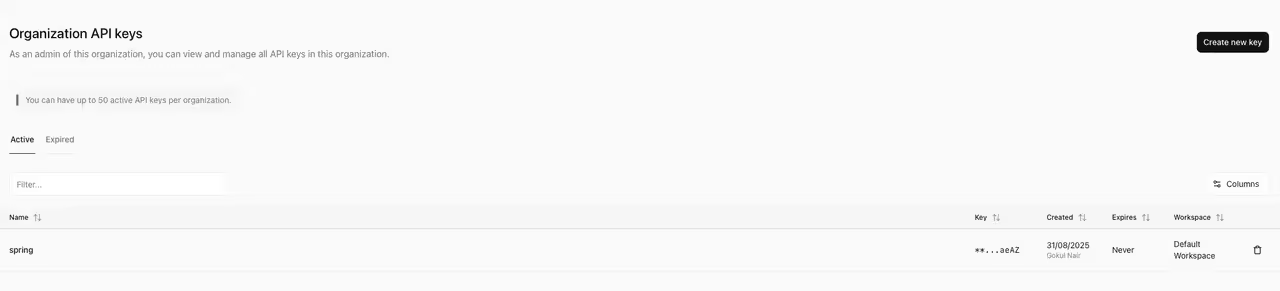
⚠️ Important: Keep your API key private. Never hardcode it into frontend code or share it publicly. Store it securely in environment variables.
Adding the configs to application.yaml file
spring:
  application:
    name: instagrat
  ai:
    mistralai:
      apiKey: ${Your Api Key for Mistral}
      model: open-mistral-7b
    vectorstore:
      pinecone:
        apiKey: ${Your Pinecone API key}
        environment: ${your environment id}
        projectId: ${your project id}
        indexName: ${your index name}

  neo4j:
    uri: bolt://localhost:7687
    authentication:
      username: neo4j
      password: demo
Add required dependencies to gradle:
dependencyManagement {
	imports {
		mavenBom "org.springframework.ai:spring-ai-bom:$springAiVersion"
	}
}

dependencies {
	implementation 'org.springframework.boot:spring-boot-starter-data-neo4j'
	implementation 'org.springframework.boot:spring-boot-starter-webflux'
	compileOnly 'org.projectlombok:lombok'
	annotationProcessor 'org.projectlombok:lombok'
	testImplementation 'org.springframework.boot:spring-boot-starter-test'
	testImplementation 'io.projectreactor:reactor-test'
	testRuntimeOnly 'org.junit.platform:junit-platform-launcher'

	implementation("org.springframework.ai:spring-ai-pinecone-store-spring-boot-starter:1.0.0-M6")
	implementation("org.springframework.ai:spring-ai-autoconfigure-vector-store-pinecone:1.0.0-M8")

	implementation 'org.springframework.ai:spring-ai-mistral-ai-spring-boot-starter'

}
Index posts in pinecone vector storage
Once the dependencies are in place, the next step is to write some Java code that can pull posts for a given user (based on their userId) from our Neo4j database. These posts will then be stored in the vector database so they can later be indexed and retrieved efficiently.
This step acts as the bridge between our graph database and the vector store — Neo4j handles the relationships and connections between users/posts, while the vector database gives us the power to perform similarity searches and semantic queries on the actual content.
    @GetMapping("/getposts/{userId}")
    Mono<Boolean> getAllPosts(@PathVariable Long userId){
        return postRepository.getAllPostsForUser(userId)
                .collectList().map(post-> {
            try {
                return Document.builder().id(userId.toString()).text(mapper.writeValueAsString(new UserPostLists(userId,post))).build();

            } catch (JsonProcessingException e) {
                throw new RuntimeException(e);
            }
        }).flatMap(docs->Mono.fromCallable(()->{
            vectorStore.add(List.of(docs));
            return true;
                }).subscribeOn(Schedulers.boundedElastic())

                );


    }
After executing this, we will have the posts indexed for the user in the pinecone db.

Now that we have our posts indexed in the vector store, the next step is to expose an endpoint that allows us to prompt BROK. This endpoint will be responsible for performing retrieval-augmented generation (RAG): fetching the most relevant data from the vector storage and passing it along with the user’s query to the LLM.
With this setup, whenever someone asks BROK a question, the system doesn’t just rely on the model’s general knowledge — it augments the response with actual context pulled from our friends’ posts. That’s what makes the answers more accurate, grounded, and useful.
 @RequestMapping("/askbrok/{userId}")
    Mono<String> askBrok(@PathVariable String userId, @RequestParam String prompt){


        PromptTemplate pt=new PromptTemplate("""
                {query}.
                Only consider posts from user {userId}.
                Summarise their latest posts clearly.
                """);

        Prompt p=pt.create(
                Map.of("query",prompt,
                        "userId",userId
                )
        );

//        SearchRequest searchRequest = SearchRequest.builder().query(prompt).filterExpression(Map.of("userId", userId)).build();

        return Mono.fromCallable(()->
                this.chatClient.prompt(p)
                        .advisors(new QuestionAnswerAdvisor(
                                store
                        )).call()
                        .content()
                ).subscribeOn(Schedulers.boundedElastic());
    }
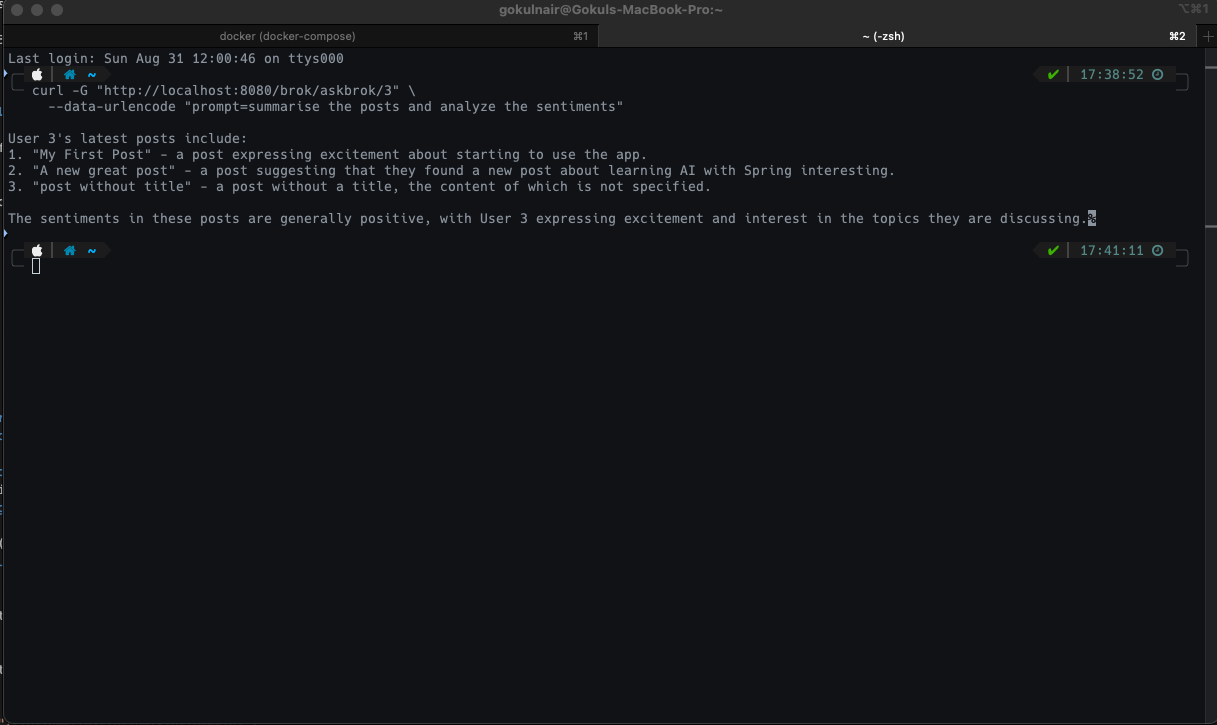
once we have the functionality set up, if we hit the endpoint with the following prompt, the output we get is:
Conclusion
🚦 Wrapping Up the Series (For Real This Time 😅)
And just like that… we’ve reached the end of this little adventure! It’s been a fun ride building out our mini social platform step by step. Over the course of this series, we’ve:
- Designed a social backend with Neo4j and Spring WebFlux
- Added the essential social features — posts, comments, likes, and follows
- Explored Cypher queries and how graph relationships give us flexibility
- Plugged into Pinecone and embeddings to power similarity search
- Layered on LLMs to make the system smarter and more interactive
- And finally, brought it all together with BROK, our own “poor man’s GROK” 🤖
This project started as a small experiment, but by the end, it turned into a playground for mixing social graph data, vector databases, and generative AI. For me, the most exciting part was watching how these technologies actually complement each other in practice — graph DBs for relationships, vectors for semantics, and LLMs for intelligence.
🚀 What’s Next?
While this is the last entry in this series, it’s by no means the end. If you’ve followed along, you now have a solid foundation to keep hacking on top of:
- Extend BROK with richer prompts and multi-turn conversations
- Experiment with Spring AI if you want tighter Spring Boot + LLM integration
- Or even take the whole thing mobile with a React Native frontend and hook it up to the backend we built here
Thanks for tagging along through this series — it’s been a long one, and if you’re reading this, you’re officially part of the “made it to the credits” club 🍿.
All the code for the series lives here 👉 github. .
This is the end of the series, but not the end of the journey. Keep experimenting, keep learning, and who knows… maybe BROK 2.0 will be smarter than we expect 😉

Happy coding! 🧑💻✨